Public event page for the party: when it's worth the effort – and how to create one
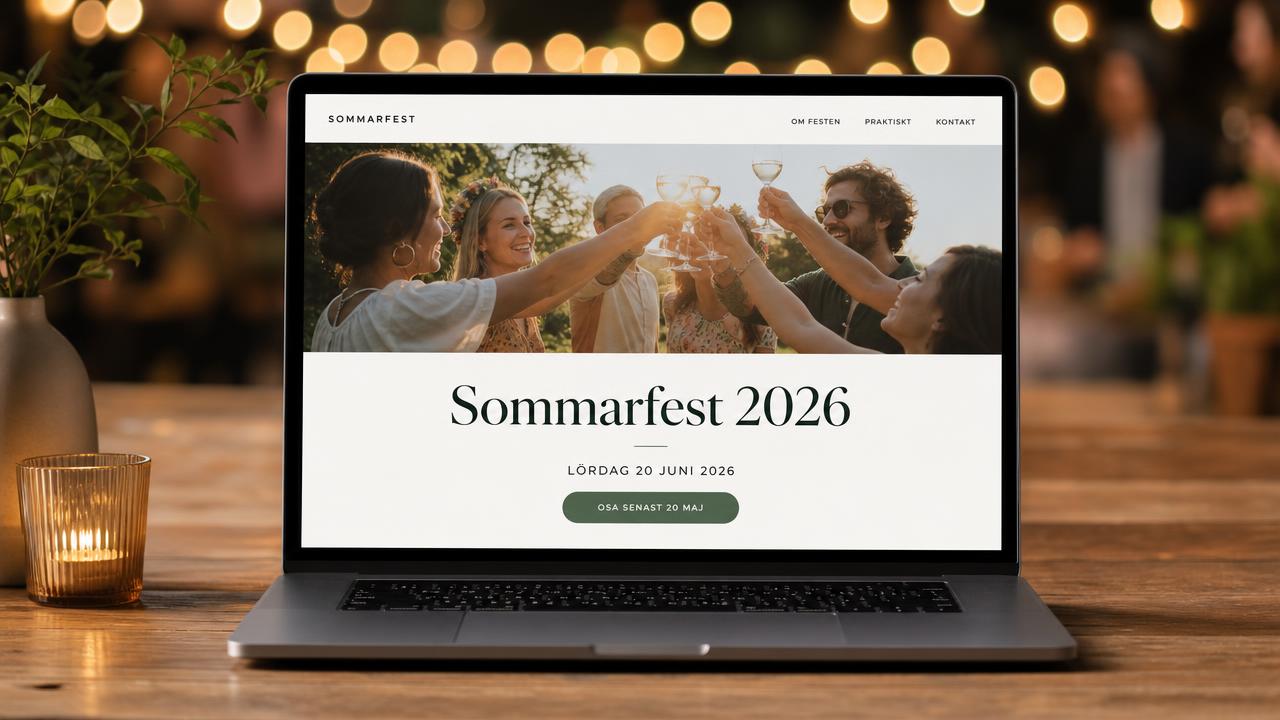
A dedicated website for your party makes it easy to share all the practical details with a single link. Here is how to choose a template, what the page should contain, and when it should be invisible to Google.
Most parties get by with just an invitation and an RSVP link. But as soon as guests start asking *"where do we park?"*, *"what is the dress code?"*, and *"when does dinner start?"* through five different channels, it's time for a public event page – a real website specifically for your party, on its own address.
When do you need an event page?
You will benefit from one when any of the following apply:
- More than ~40 guests
- Guests traveling to the event who need accommodation and travel tips
- A program spanning several hours or multiple days
- A recurring event with open registration
- Multiple organizers who would otherwise answer the same questions repeatedly
Is it a dinner for twelve? Then an invitation is enough. An event page is for when the information doesn't fit on a card.
What the page should contain
Keep it short. An event page that no one bothers to read is worse than none at all.
- Hero – party name, image, date, and time at the very top
- Countdown – a simple reminder that the big day is approaching
- Location – address, map link, and "add to calendar"
- Schedule – pulled from your agenda, item by item
- Custom text blocks – dress code, parking, accommodation, gifts, contact info
- RSVP button – leading to the same response flow as the invitation
And just as important: guest lists, photos, playlists, and chats do not belong on a public page. That is content only invited guests should see.
Choose a template based on content, not the other way around
In Joynify, you choose one of four templates that automatically use the same colors and fonts as your invitation card:
- Classic – centered and calm, sections stacked vertically. For weddings and formal occasions.
- Modern – asymmetrical hero and bold color blocks. For corporate parties and launches.
- Photo – full-screen image with text overlay. For when the image is the message.
- Minimal – just typography and white space, no image. For formal events.
Custom address and the link you share
The page gets an address like joynify.app/e/summer-party-2026. You choose the slug yourself, and the system tells you immediately if it's taken. Use a year in the address if the event is recurring – that way you can keep last year's page as a reference.
Visible on Google or only via a link?
This is the most important choice, and it's often overlooked.
| Choice | Who finds the page | Best for |
|---|---|---|
| Visible on Google | Anyone searching | Open, public events: markets, concerts, community events |
| Link only | Only those with the link | Private parties: weddings, birthdays, corporate parties |
With "link only," the page works for anyone who has the address, but it receives noindex and is not listed in the sitemap. Your wedding shouldn't show up in search results with the address and time – it is both a matter of privacy and a security issue when the house is empty during the party.
If the page is disabled, a 404 is shown. No one can guess the content.
SEO for those who actually want to be found
If you are running a public event, the page is your best channel:
- Set a descriptive title: "Spring Market Uppsala 2026 – April 12th"
- Write a meta description under 160 characters including location and date
- Let the hero image be the og-image so the link looks good when shared
- Event structured data is added automatically, which can provide rich results with date and location directly in search results
How to do it in Joynify
Open the party in the admin panel, go to Event Page, turn it on, choose the address and template, check whether the schedule, RSVP, and countdown should be displayed, add your text blocks, and choose visibility. The page goes live immediately – changes are visible instantly.
Summary
An event page doesn't replace the invitation; it supports it. Keep it short, choose a template based on content, and think twice before letting Google into a private party.
FAQ
Vad är en publik eventsida?+
Det är en egen webbsida för ett enskilt evenemang, med festens namn, bild, datum, plats, program och en OSA-knapp. Den ligger på en egen adress som du kan dela med en länk eller QR-kod, utan att gästen behöver logga in.
Behöver alla fester en egen eventsida?+
Nej. För en mindre middag räcker inbjudan och OSA-länken. En eventsida gör störst nytta vid fler än cirka 40 gäster, långresande gäster, program över flera timmar eller återkommande arrangemang med öppen anmälan.
Kan jag hindra att eventsidan syns i Google?+
Ja. I Joynify väljer du mellan Synlig i Google och Endast via länk. Endast via länk gör att sidan fungerar för alla som har adressen men får noindex och inte tas med i sitemapen, vilket är rekommenderat för privata fester.
Vilken adress får eventsidan?+
Sidan ligger på en adress i formatet joynify.app/e/din-slug, till exempel joynify.app/e/sommarfest-2026. Du väljer slugen själv och får direkt besked om den redan är upptagen.
Syns gästlistan eller bilderna på den publika sidan?+
Nej. Gästlista, foton, spellista och chatt visas aldrig publikt. Den publika sidan innehåller bara det du väljer att dela: hero, nedräkning, plats, program, egna textblock och OSA-knappen.
Kan gästerna lägga till evenemanget i sin kalender?+
Ja, eventsidan har en knapp för att lägga till i kalendern som fungerar med både Google Kalender och iCal, så att datum, tid och plats hamnar rätt direkt i gästens telefon.